Page Linking
Grav has a variety of flexible linking options that allow you to link from one page to another, and even to remote pages. If you have ever linked files using HTML or worked with a file system using a command line, a lot of this should be very easy to pick up.
We will run to some easy examples using this very basic, trimmed down model of what a Grav site's Pages directory might look like.
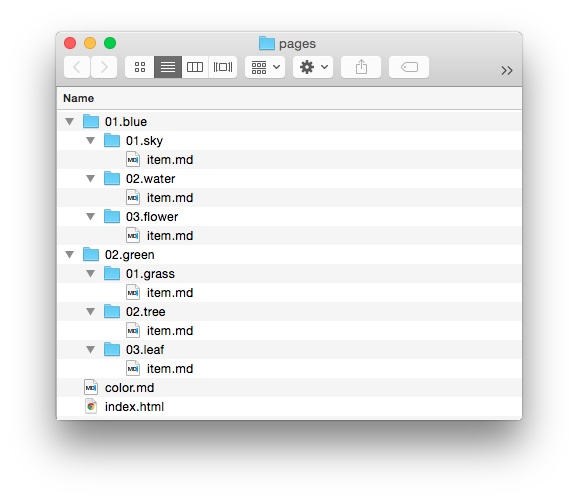
Using this directory structure as an example, we will take a look at the different types of links you can use in your content.
To get us started, here is a quick look at some of the common components of a Grav link, and what they mean.
[Linked Content](../path/slug/page)
| String | Description |
|---|---|
[] |
The square bracket is used to wrap the text or alternate content that becomes linked. In HTML, this would be the content placed between <a href=""> and </a>. |
() |
The parenthesis is used to surround the link itself. This is placed directly after the square bracket. |
../ |
When used in the link, it indicates a move up a directory. |
Se även Typgrafi
Testa även detta: Dickens
Slug Relative
Grav doesn't just limit your internal links to specific names within your file/directory structure. It can also pull slugs assigned both in the header of the file, as well as the fallback directory name. This makes creating quick links easy as you don't have to remember the specific file name, but an easily remembered (and relevant) slug.
Grav's templating engine uses file names to determine which template to apply to them. For example, a blog might use the standard file name item.md for each blog post. The blog post itself can be assigned a slug that makes more sense, such as grass or grass-is-green.
Directory names also have numbers assigned which helps with ordering. You don't have to include these numbers with slug-relative links. Grav ignores them when creating the slug, so your site's URL structure is cleaner.
Here are a few examples of slug-relative links.
In this example, we're moving up a directory and loading the default page located in the pages/01.blue/02.water/item.md directory from pages/01.blue/01.sky/item.md. The file, item.md, has no assigned slug, so Grav uses the directory name.
[link](../water)
